---
title: Where do I install snap ring on 5100 RHA and 6112
description: Please refer directly to your instruction manual to verify what lift heights are available for your vehicle.
---
[Skip to content](https://academy.bilsteinus.com/knowledge/where-do-i-install-snap-ring-on-5100-rha/-5112/6112#main-content)
English
Show submenu for translations
![Bilstein\_Logo\_3c-2.png\]](https://academy.bilsteinus.com/hs-fs/hubfs/Bilstein_Logo_3c-2.png?height=40&name=Bilstein_Logo_3c-2.png)
Open main navigation
Close main navigation
- English
Show submenu for translations
- [Go to bilstein.com](https://www.bilstein.com/us/en/)
[Go to bilstein.com](https://www.bilstein.com/us/en/)
Hello. How can we help you?
- There are no suggestions because the search field is empty.
1. [Help Center](https://academy.bilsteinus.com/knowledge?hsLang=en)
2. [Tech Support](https://academy.bilsteinus.com/knowledge/tech-support?hsLang=en)
3. [Installation](https://academy.bilsteinus.com/knowledge/tech-support?hsLang=en#installation)
# Where do I install snap ring on 5100 RHA and 6112
## Please refer directly to your instruction manual to verify what lift heights are available for your vehicle.
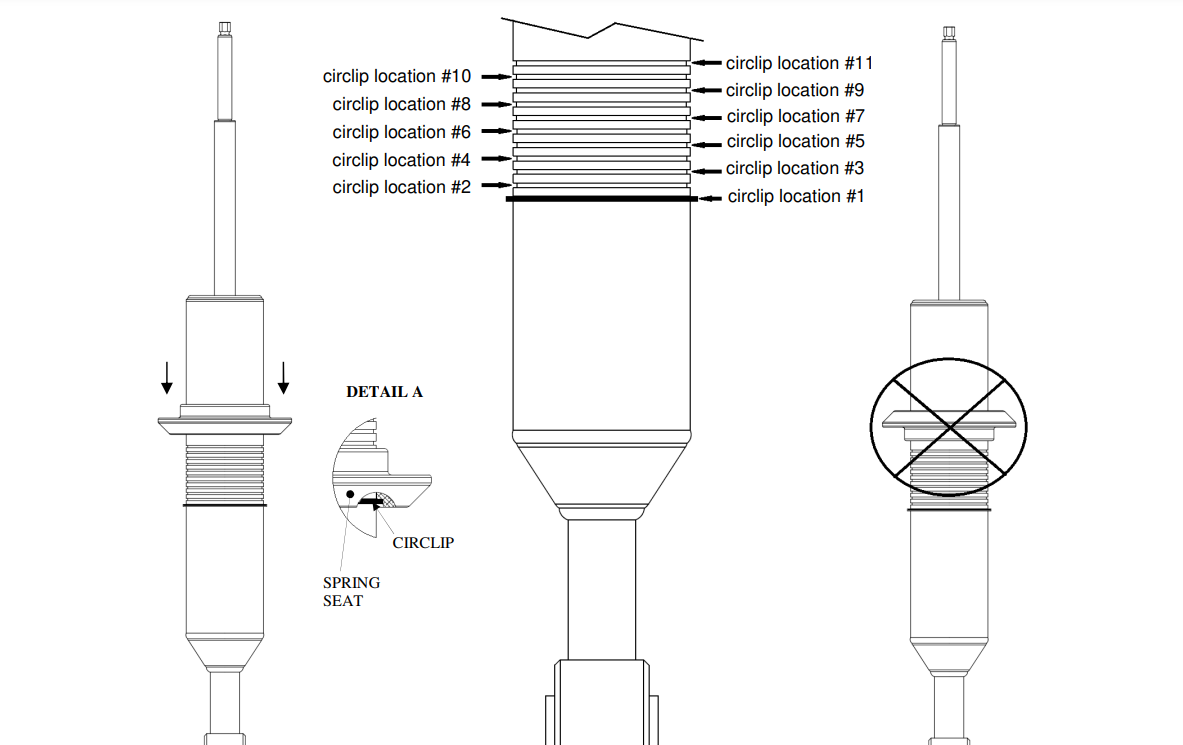
Installation instructions will list details on which snap groove ring location equals what average lift height for your specific vehicle. Every 5100/6112 ride height adjustable strut is going to achieve a different lift height depending on the model it is designated for. Please refer directly to your instruction manual to verify what lift heights are available for your vehicle. Below is a ***sample*** of the circlip position chart in the install manual. Make sure you use the chart for your part number, they are very specific. Also notate the position of the spring seat on the circlip. Once the desired circlip locations are set (make sure to use proper tools to move circlip i.e. circlip pliers and confirm the circlip is fully seated in the groove) then position the lower spring seat to engage the circlip as shown below in detail A.
- [Product Support](https://academy.bilsteinus.com/knowledge/product-support?hsLang=en#main-content)
- [General Product Questions](https://academy.bilsteinus.com/knowledge/product-support?hsLang=en#general-product-questions)
- [Application/ Parts Catalog](https://academy.bilsteinus.com/knowledge/product-support?hsLang=en#application-parts-catalog)
- [Tech Support](https://academy.bilsteinus.com/knowledge/tech-support?hsLang=en#main-content)
- [Installation](https://academy.bilsteinus.com/knowledge/tech-support?hsLang=en#installation)
- [Tuning](https://academy.bilsteinus.com/knowledge/tech-support?hsLang=en#tuning)
- [Service and Repair](https://academy.bilsteinus.com/knowledge/service-and-repair?hsLang=en#main-content)
- [Shock Repair/ Refurbish Services](https://academy.bilsteinus.com/knowledge/service-and-repair?hsLang=en#shock-repair-refurbish-services)
- [Warranty](https://academy.bilsteinus.com/knowledge/warranty?hsLang=en#main-content)
- [Warranty Policy](https://academy.bilsteinus.com/knowledge/warranty?hsLang=en#warranty-policy)
- [Sales Support](https://academy.bilsteinus.com/knowledge/sales-support?hsLang=en)
- [Marketing/Other](https://academy.bilsteinus.com/knowledge/marketing-other?hsLang=en)
- [Careers](https://academy.bilsteinus.com/knowledge/careers?hsLang=en#main-content)
- [Careers](https://academy.bilsteinus.com/knowledge/careers?hsLang=en#careers)
- [Podcast - BILSTEIN Shock Talk](https://academy.bilsteinus.com/knowledge/podcast-bilstein-shock-talk?hsLang=en)
[](https://bilstein.com/en-us)
bilstein.com Help Center
Copyright © 2026, thyssenkrupp Bilstein of America